 Tizian 「ティツィアーン」
438ce20dbf
AGP 9 compiles Kotlin itself (android.builtInKotlin=true in every app),
and warns that applying the Kotlin Gradle Plugin will soon fail.
flutter_web_auth_2 5.1.0, keyboard_height_plugin 0.3.0 and flutter_tts
4.2.5 still apply it unconditionally, so their pub releases are copied
into third_party/ with only their android/build.gradle changed, and
the root overrides them by path (third_party/README.md says when to
drop each). The servers' images copy third_party/, as pub refuses an
override whose path is missing. third_party/ isn't our own code: left
out of the analysis and the format check.

All four apps' APKs build without the warning. A Kotlin daemon's
session file that slipped into Train's android/ goes, and every app's
android/.gitignore keeps .kotlin/ out.

Co-Authored-By: Claude Opus 5.5 <noreply@anthropic.com>
Signed-off-by: Tizian 「ティツィアーン」 <raisondetredev@pm.me>
396 lines
19 KiB
Markdown
396 lines
19 KiB
Markdown
# Web Auth 2 for Flutter
|
|
|
|
**This project is a continuation of [flutter_web_auth](https://github.com/LinusU/flutter_web_auth) by Linus Unnebäck with many new features and bug fixes.**
|
|
|
|
[](https://github.com/invertase/melos)
|
|
|
|
A Flutter plugin for authenticating a user with a web service, even if the web service is run by a third party. Most commonly used with OAuth2, but can be used with any web flow that can redirect to a custom scheme.
|
|
|
|
In the background, this plugin uses [`ASWebAuthenticationSession`](https://developer.apple.com/documentation/authenticationservices/aswebauthenticationsession) on iOS 12+ and macOS 10.15+, [`SFAuthenticationSession`](https://developer.apple.com/documentation/safariservices/sfauthenticationsession) on iOS 11, [Chrome Auth Tab](https://developer.chrome.com/docs/android/custom-tabs/guide-auth-tab) on Android and opens a new window on Web. You can build it with iOS 8+, but it is currently only supported by iOS 11 or higher.
|
|
|
|
<!-- TODO: Replace with a nicer GIF
|
|
| **iOS** | **Android** |
|
|
| ---------------------- | ------------------------------ |
|
|
| 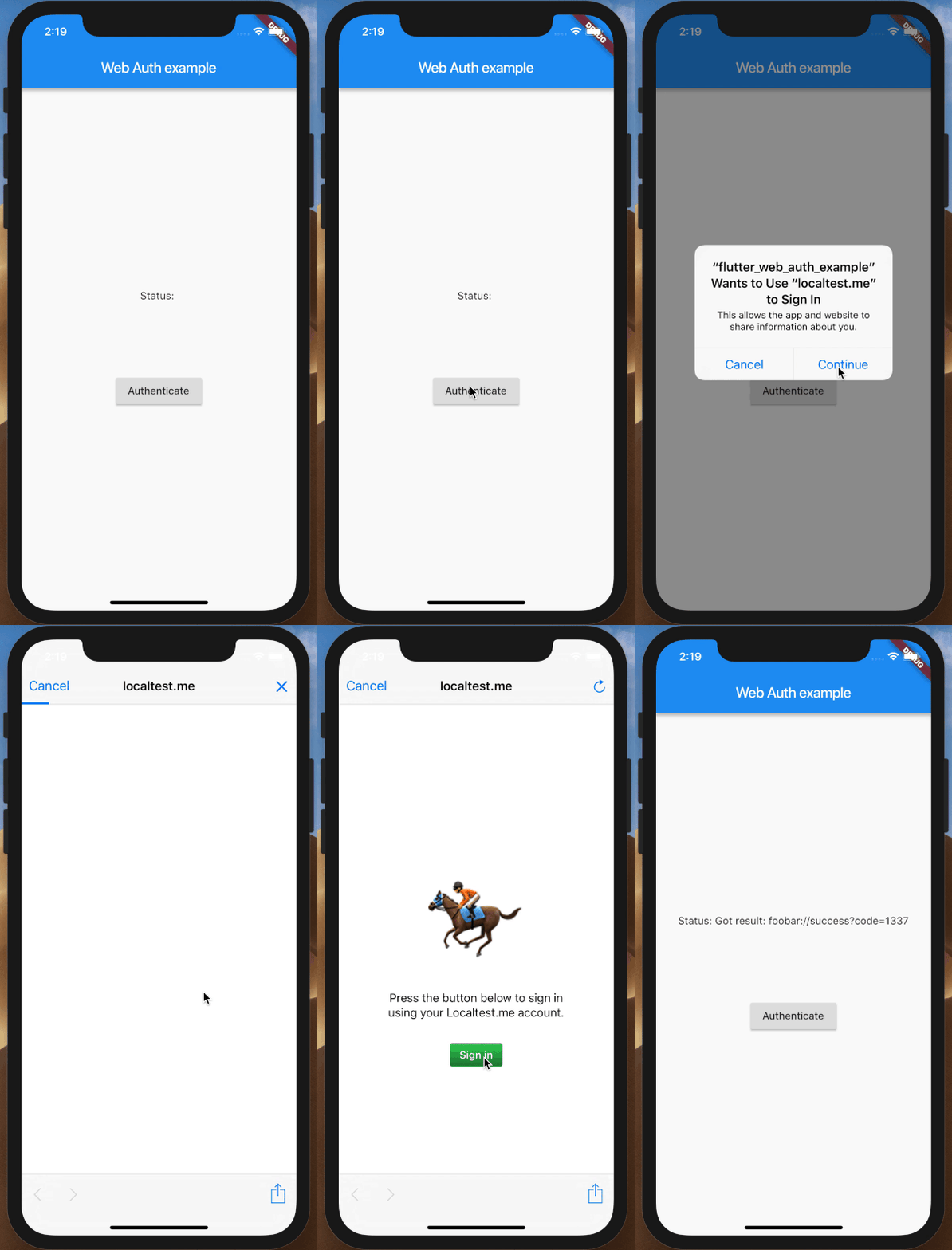 | 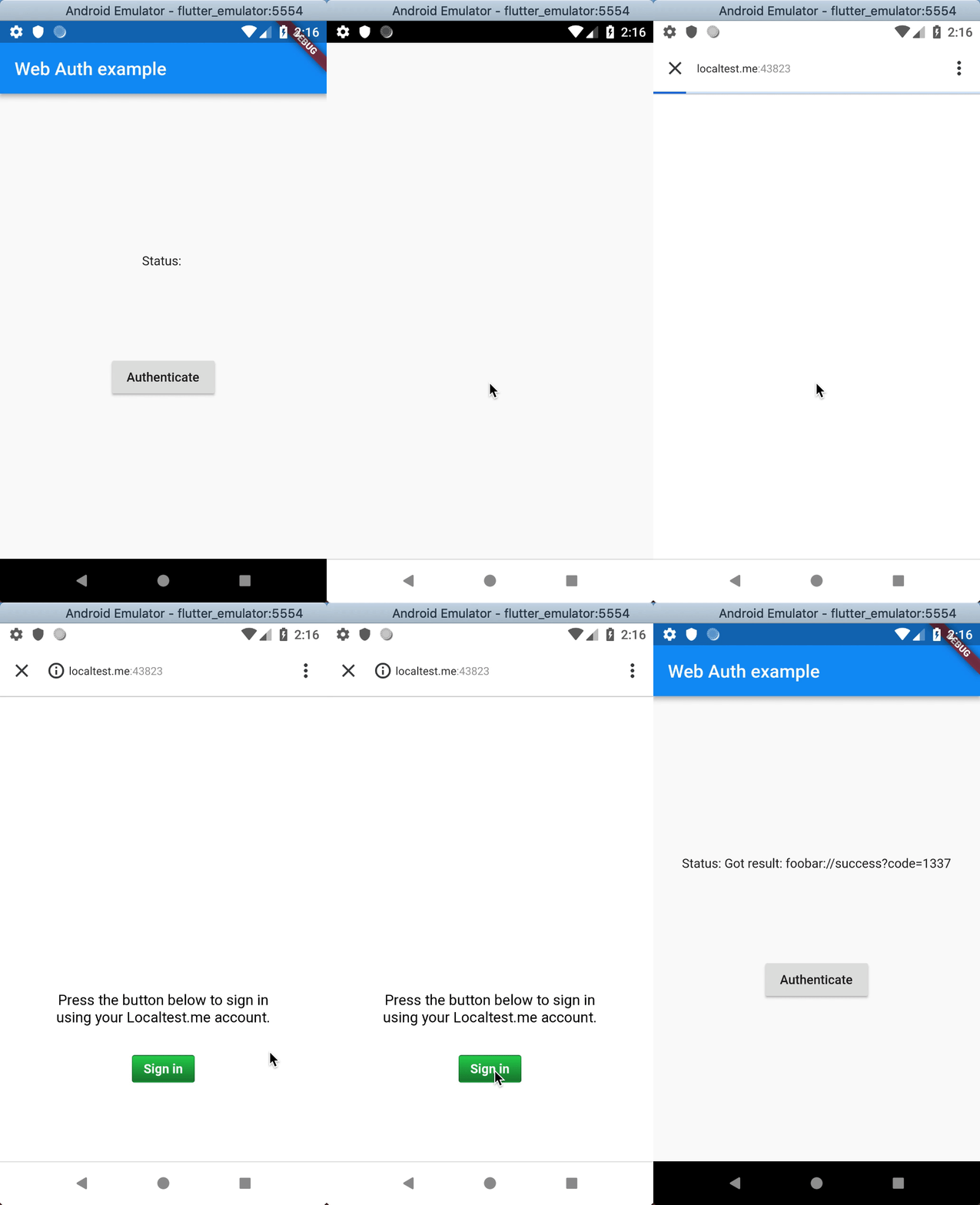 |
|
|
|
|
| **macOS** |
|
|
| -------------------------- |
|
|
| 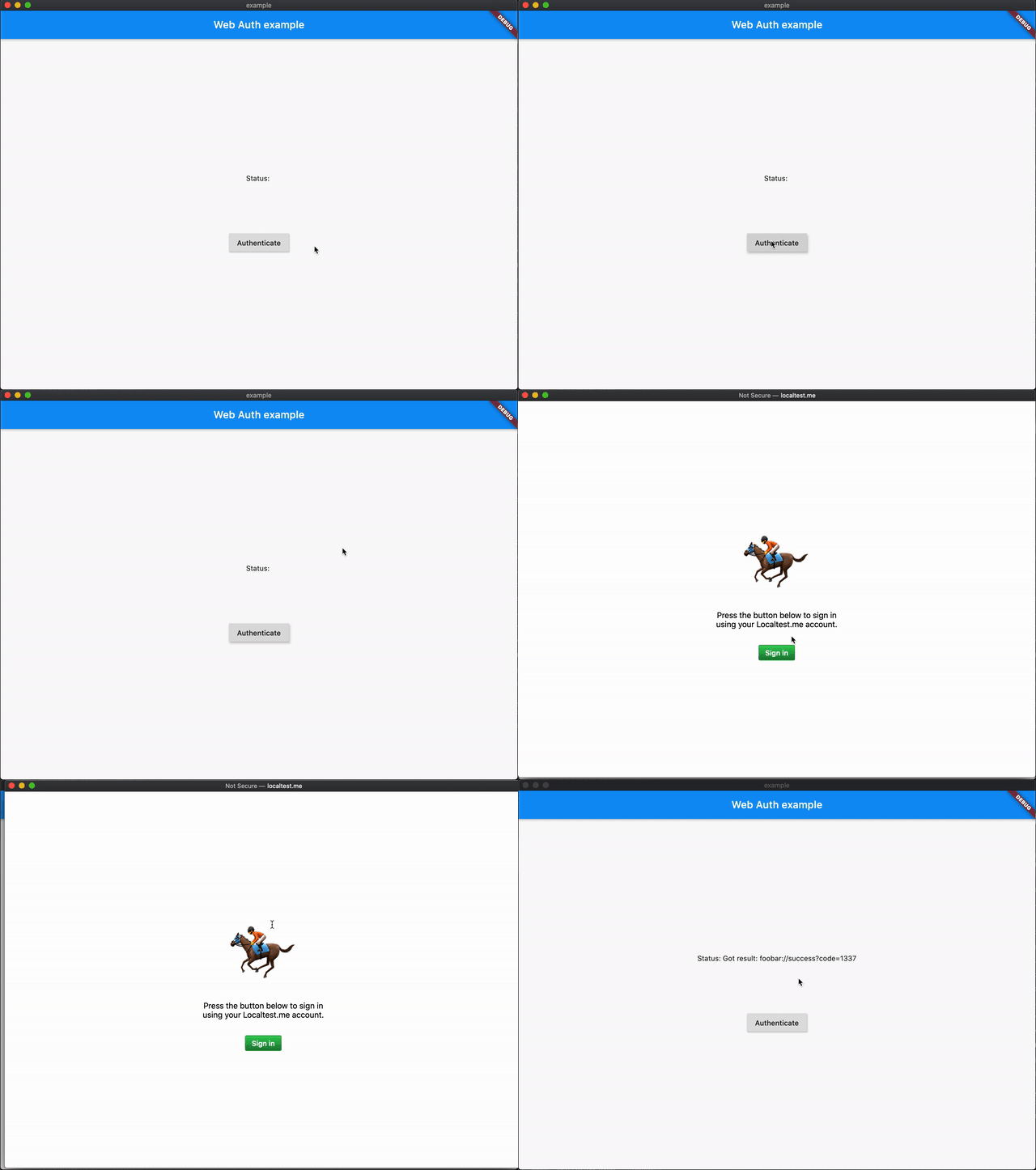 |
|
|
-->
|
|
|
|
## Usage
|
|
|
|
Add the following snippet to your `pubspec.yaml` and follow the [Setup guide](#setup):
|
|
|
|
```yaml
|
|
dependencies:
|
|
flutter_web_auth_2: ^5.0.0
|
|
```
|
|
|
|
To authenticate against your own custom site:
|
|
|
|
```dart
|
|
import 'package:flutter_web_auth_2/flutter_web_auth_2.dart';
|
|
|
|
// Present the dialog to the user
|
|
final result = await FlutterWebAuth2.authenticate(url: "https://my-custom-app.com/connect", callbackUrlScheme: "my-custom-app");
|
|
|
|
// Extract token from resulting url
|
|
final token = Uri.parse(result).queryParameters['token'];
|
|
```
|
|
|
|
To authenticate the user using Google's OAuth2:
|
|
|
|
```dart
|
|
import 'package:flutter_web_auth_2/flutter_web_auth_2.dart';
|
|
|
|
import 'dart:convert' show jsonDecode;
|
|
import 'package:http/http.dart' as http;
|
|
|
|
// App specific variables
|
|
final googleClientId = 'XXXXXXXXXXXX-xxxxxxxxxxxxxxxxxxxxxxxxxxxxxxxx.apps.googleusercontent.com';
|
|
final callbackUrlScheme = 'com.googleusercontent.apps.XXXXXXXXXXXX-xxxxxxxxxxxxxxxxxxxxxxxxxxxxxxxx';
|
|
|
|
// Construct the url
|
|
final url = Uri.https('accounts.google.com', '/o/oauth2/v2/auth', {
|
|
'response_type': 'code',
|
|
'client_id': googleClientId,
|
|
'redirect_uri': '$callbackUrlScheme:/',
|
|
'scope': 'email',
|
|
});
|
|
|
|
// Present the dialog to the user
|
|
final result = await FlutterWebAuth2.authenticate(url: url.toString(), callbackUrlScheme: callbackUrlScheme);
|
|
|
|
// Extract code from resulting url
|
|
final code = Uri.parse(result).queryParameters['code'];
|
|
|
|
// Construct an Uri to Google's oauth2 endpoint
|
|
final url = Uri.https('www.googleapis.com', 'oauth2/v4/token');
|
|
|
|
// Use this code to get an access token
|
|
final response = await http.post(url, body: {
|
|
'client_id': googleClientId,
|
|
'redirect_uri': '$callbackUrlScheme:/',
|
|
'grant_type': 'authorization_code',
|
|
'code': code,
|
|
});
|
|
|
|
// Get the access token from the response
|
|
final accessToken = jsonDecode(response.body)['access_token'] as String;
|
|
```
|
|
|
|
**Note (Google multiple scopes):** To use multiple scopes with Google, you need to encode them as a single string, separated by spaces (`%20`). For example, `scope: 'email https://www.googleapis.com/auth/userinfo.profile'`. Here is [a list of all supported scopes](https://developers.google.com/identity/protocols/oauth2/scopes).
|
|
|
|
**Note (ephemeral auth):** Due to a [known Chrome bug](https://issuetracker.google.com/issues/444173718), when setting `preferEphemeral: true` on Android with Chrome < 141, the package will launch an auth session with older implementation to avoid crashes.
|
|
|
|
## Migration
|
|
|
|
### Upgrading to `5.x`
|
|
|
|
The following constraints have been added in `5.0.0`:
|
|
- The existing Android approach has been replaced with a new (improved) one (no migration necessary; is automatically used)
|
|
- Android now uses Auth Tab: `httpsHost` and `httpsPath` are now required on Android if you are using a `https` in `callbackUrlScheme`
|
|
- On Android, issues with `taskAffinity`s have been fixed and it is strongly advised to set `android:taskAffinity=""` for all exported `Activity`s (this usually includes your `MainActivity` and `flutter_web_auth_2`'s `CallbackActivity`)
|
|
- Dart SDK `>=3.5.0` is now required (due to migration to melos `7.x`)
|
|
- If you want ephemeral authentication on Android, use `preferEphemeral` instead of `ephemeralIntentFlags` as `intentFlags` have other influences now
|
|
|
|
### Upgrading to `4.x`
|
|
|
|
Generally, the following constraints have been added in version `4.0.0`:
|
|
- Android embedding v1 support has been removed (it was deprecated already long ago)
|
|
- Android min SDK and JVM version has been increased to 21 and 11, respectively (in accordance with
|
|
Flutter `3.22.0`)
|
|
- Migrated away from deprecated iOS and macOS functions (now iOS 17.4 and macOS 14.4 are required!)
|
|
|
|
Version `4.0.0` also introduced a new approach for Linux and Windows to authenticate users - using
|
|
Webview APIs. Hence, you only need to change your code if you are targeting Linux or Windows.
|
|
If you are fine with still using the old version, here is what you need to change:
|
|
- Pass `useWebview: false` into the options of your call to `authenticate`, like so:
|
|
```dart
|
|
final result = await FlutterWebAuth2.authenticate(
|
|
url: url,
|
|
callbackUrlScheme: 'foobar',
|
|
options: const FlutterWebAuth2Options(useWebview: false),
|
|
);
|
|
```
|
|
|
|
If you want to use the new approach (**default behaviour!**), you need to do a bit more:
|
|
- Follow the "Getting started" guide of
|
|
[desktop_webview_window](https://pub.dev/packages/desktop_webview_window#getting-started)
|
|
- Make sure that your users know about the new requirements, as described
|
|
[here](https://pub.dev/packages/desktop_webview_window)
|
|
|
|
Last, but not least, version `4.0.0` also added *full* support for Universal links on iOS and macOS!
|
|
In order to do this, two additional options have been added (which are *required* if
|
|
`callbackUrlScheme` is `https`!):
|
|
- `httpsHost` is the host of the callback URL
|
|
- `httpsPath` is the path of the callback URL
|
|
|
|
### Upgrading to `3.x`
|
|
|
|
Version `3.0.0` featured a huge refactor which made it possible to maintain even more configuration
|
|
possibilities. Even platform-specific ones! If you want to upgrade, you need to do the following:
|
|
- Follow the [Setup] within this README again for your platform and do it from scratch (there might
|
|
be changes!)
|
|
- Dart SDK constraints have been updated to `>=2.15.0`.
|
|
- The configuration parameters have been removed from the `authenticate` function. Now, you have to
|
|
pass a `FlutterWebAuth2Options` object with those options in it instead:
|
|
- `contextArgs`: This is now called `windowName` within `FlutterWebAuth2Options`.
|
|
- `redirectOriginOverride`: This is now called `debugOrigin` within `FlutterWebAuth2Options`.
|
|
- `preferEphemeral`: This has been split into the two named parameters `preferEphemeral` (for
|
|
iOS and MacOS) and `intentFlags` (for Android) within `FlutterWebAuth2Options`. The former works
|
|
exactly the same. However, if you want the old behaviour using `preferEphemeral` on Android, use
|
|
the `ephemeralIntentFlags` constant as value for `intentFlags`. **(THIS WAS REVERTED IN 5.x)**
|
|
|
|
### Upgrading from `flutter_web_auth`
|
|
|
|
If you used `flutter_web_auth` correctly (and without extra hackage) before, it should be sufficient to replace the following strings *everywhere* (yes, also in `AndroidManifest.xml` for example):
|
|
- `FlutterWebAuth` -> `FlutterWebAuth2`
|
|
- `flutter_web_auth` -> `flutter_web_auth_2`
|
|
|
|
If you are using versions `>= 3.0.0`, you also need to follow the migration guide(s) above!
|
|
|
|
If you are still unsure or something is not working as well as before, please [open a new issue](https://github.com/ThexXTURBOXx/flutter_web_auth_2/issues/new/choose).
|
|
|
|
### Built-in KGP/AGP 9+ support
|
|
|
|
If you need to use built-in Kotlin Gradle plugin or Android Gradle Plugin 9+, use versions `6.x`.
|
|
|
|
## Setup
|
|
|
|
Setup is the same as for any Flutter plugin, with the following caveats:
|
|
|
|
### Android
|
|
|
|
In order to capture the callback url, the following `activity` needs to be added to your `AndroidManifest.xml`. Be sure to replace `YOUR_CALLBACK_URL_SCHEME_HERE` with your actual callback url scheme.
|
|
|
|
```xml
|
|
<manifest>
|
|
<application>
|
|
|
|
<activity
|
|
android:name="com.linusu.flutter_web_auth_2.CallbackActivity"
|
|
android:exported="true"
|
|
android:taskAffinity="">
|
|
<intent-filter android:label="flutter_web_auth_2">
|
|
<action android:name="android.intent.action.VIEW" />
|
|
<category android:name="android.intent.category.DEFAULT" />
|
|
<category android:name="android.intent.category.BROWSABLE" />
|
|
<data android:scheme="YOUR_CALLBACK_URL_SCHEME_HERE" />
|
|
</intent-filter>
|
|
</activity>
|
|
|
|
</application>
|
|
</manifest>
|
|
```
|
|
|
|
If you are using `http` or `https` as your callback scheme, you also need to specify a host etc.
|
|
See [c:geo](https://github.com/cgeo/cgeo/blob/d7ab67629ac4798adaae194e563afe7df134fcd0/main/AndroidManifest.xml#L164) as an example for this.
|
|
|
|
### iOS
|
|
|
|
For "normal" authentication, just use this library as usual; there is nothing special to do!
|
|
|
|
To authenticate using [Universal Links](https://developer.apple.com/library/archive/documentation/General/Conceptual/AppSearch/UniversalLinks.html)
|
|
on iOS, use `https` as the provided `callbackUrlScheme`:
|
|
|
|
```dart
|
|
final result = await FlutterWebAuth2.authenticate(url: "https://my-custom-app.com/connect", callbackUrlScheme: "https");
|
|
```
|
|
|
|
### Web
|
|
|
|
On the Web platform, an endpoint must be created that captures the callback URL and sends it to the application using the JavaScript `postMessage()` method. In the `./web` folder of the project, create an HTML file named, e.g. `auth.html` with content:
|
|
|
|
```html
|
|
<!DOCTYPE html>
|
|
<title>Authentication complete</title>
|
|
<p>Authentication is complete. If this does not happen automatically, please close the window.</p>
|
|
<script>
|
|
function postAuthenticationMessage() {
|
|
const message = {
|
|
'flutter-web-auth-2': window.location.href
|
|
};
|
|
|
|
if (window.opener) {
|
|
window.opener.postMessage(message, window.location.origin);
|
|
window.close();
|
|
} else if (window.parent && window.parent !== window) {
|
|
window.parent.postMessage(message, window.location.origin);
|
|
} else {
|
|
localStorage.setItem('flutter-web-auth-2', window.location.href);
|
|
window.close();
|
|
}
|
|
}
|
|
|
|
postAuthenticationMessage();
|
|
</script>
|
|
```
|
|
|
|
This HTML file is designed to handle both traditional `window`-based and `iframe`-based authentication flows. The JavaScript code checks the context and sends the authentication response accordingly.
|
|
|
|
The redirect URL passed to the authentication service must be the same as the URL the application is running on (schema, host, port if necessary) and the path must point to the generated HTML file, in this case `/auth.html`. The `callbackUrlScheme` parameter of the `authenticate()` method does not take this into account, so it is possible to use a schema for native platforms in the code.
|
|
|
|
For the Sign in with Apple in web_message response mode, postMessage from https://appleid.apple.com is also captured, and the authorisation object is returned as a URL fragment encoded as a query string (for compatibility with other providers).
|
|
|
|
Additional parameters for the URL open call can be passed in the `authenticate` function using the `windowName` parameter from the options. The `silentAuth` parameter can be used to enable silent authentication within a hidden `iframe`, rather than opening a new window or tab. This is particularly useful for scenarios where a full-page redirect is not desirable. Setting this parameter to `true` allows for a seamless user experience by performing authentication in the background, making it ideal for token refreshes or maintaining user sessions without requiring explicit interaction from the user.
|
|
|
|
### Windows and Linux
|
|
|
|
When using `useWebview: false`, there is a limitation that the callback URL scheme must start with `http://localhost:{port}`.
|
|
|
|
When specifying `useWebview: true` (which is the default behaviour), you need to make sure to follow [desktop_webview_window's guide](https://pub.dev/packages/desktop_webview_window).
|
|
Also be aware that your users might need to install a Webview API (which is preinstalled on Windows 11 and some Windows 10 and Linux installations).
|
|
For details, see also desktop_webview_window's guide above.
|
|
|
|
## Troubleshooting
|
|
|
|
When you use this package for the first time, you may experience some problems. These are some of the most common solutions:
|
|
|
|
### General troubleshooting steps
|
|
|
|
1. Stop the application if it is running.
|
|
2. Run the following commands:
|
|
- `flutter clean`
|
|
- `flutter pub upgrade`
|
|
3. Rerun the application after executing the above commands. Sometimes, they work wonders!
|
|
|
|
### Troubleshooting `callbackUrlScheme`
|
|
|
|
- `callbackUrlScheme` must be a valid schema string or else this library won't work
|
|
- A valid RFC 3986 URL scheme must consist of "a letter and followed by any combination of letters, digits, plus "`+`", period "`.`", or hyphen "`-`"
|
|
- scheme = `ALPHA *( ALPHA / DIGIT / "+" / "-" / "." )`
|
|
- This means you can not use underscore "`_`", space "` `" or uppercase "`ABCDEF...`". It must also not start with a number. See [RFC3986#page-17](https://www.rfc-editor.org/rfc/rfc3986#page-17)
|
|
- Examples of VALID `callbackUrlScheme`s are `callback-scheme`, `another.scheme`, `examplescheme`
|
|
- Examples of INVALID `callbackUrlScheme`s are `callback_scheme`,`1another.scheme`, `exampleScheme`
|
|
|
|
### Troubleshooting Flutter App
|
|
|
|
- You have to tell the `FlutterWebAuth2.authenticate` function what your `callbackUrlScheme` is.
|
|
- Example: If your `callbackUrlScheme` is `valid-callback-scheme`, your dart code will look like
|
|
|
|
```dart
|
|
import 'package:flutter_web_auth_2/flutter_web_auth_2.dart';
|
|
|
|
// Present the dialog to the user
|
|
final result = await FlutterWebAuth2.authenticate(url: "https://my-custom-app.com/connect", callbackUrlScheme: "valid-callback-scheme");
|
|
```
|
|
|
|
### Troubleshooting Android
|
|
|
|
- You will need to update your `AndroidManifest.xml` to include the `com.linusu.flutter_web_auth_2.CallbackActivity` activity, something like
|
|
|
|
```xml
|
|
<manifest>
|
|
<application>
|
|
|
|
<!-- add the com.linusu.flutter_web_auth_2.CallbackActivity activity -->
|
|
<activity
|
|
android:name="com.linusu.flutter_web_auth_2.CallbackActivity"
|
|
android:exported="true"
|
|
android:taskAffinity="">
|
|
<intent-filter android:label="flutter_web_auth_2">
|
|
<action android:name="android.intent.action.VIEW" />
|
|
<category android:name="android.intent.category.DEFAULT" />
|
|
<category android:name="android.intent.category.BROWSABLE" />
|
|
<data android:scheme="YOUR_CALLBACK_URL_SCHEME_HERE" />
|
|
</intent-filter>
|
|
</activity>
|
|
|
|
</application>
|
|
</manifest>
|
|
```
|
|
|
|
- Example of a valid `AndroidManifest.xml` with VALID `callbackUrlScheme`. In the example below our `callbackUrlScheme` is `valid-callback-scheme`.
|
|
|
|
```xml
|
|
<manifest>
|
|
<application>
|
|
<activity
|
|
android:name="com.linusu.flutter_web_auth_2.CallbackActivity"
|
|
android:exported="true"
|
|
android:taskAffinity="">
|
|
<intent-filter android:label="flutter_web_auth_2">
|
|
<action android:name="android.intent.action.VIEW" />
|
|
<category android:name="android.intent.category.DEFAULT" />
|
|
<category android:name="android.intent.category.BROWSABLE" />
|
|
<data android:scheme="valid-callback-scheme" />
|
|
</intent-filter>
|
|
</activity>
|
|
|
|
</application>
|
|
</manifest>
|
|
```
|
|
|
|
- If you are targeting S+ (SDK version 31 and above) you need to provide an explicit value for `android:exported`. If you followed earlier installation instructions, this was not included. Make sure that you add `android:exported="true"` to the `com.linusu.flutter_web_auth.CallbackActivity` activity in your `AndroidManifest.xml` file.
|
|
|
|
```diff
|
|
- <activity android:name="com.linusu.flutter_web_auth_2.CallbackActivity">
|
|
+ <activity
|
|
+ android:name="com.linusu.flutter_web_auth_2.CallbackActivity"
|
|
+ android:exported="true"
|
|
+ android:taskAffinity="">
|
|
```
|
|
|
|
- If you want to have a callback URL with `http` or `https` scheme, you also need to specify a host etc.
|
|
See [c:geo](https://github.com/cgeo/cgeo/blob/d7ab67629ac4798adaae194e563afe7df134fcd0/main/AndroidManifest.xml#L164) as an example for this.
|
|
- In older versions of this package, there was a known problem with task affinities and launch modes (see [#113](https://github.com/ThexXTURBOXx/flutter_web_auth_2/issues/113)). In order to ensure that `flutter_web_auth_2` works correctly on these versions (prior to `5.0.0-alpha.2`), set `android:launchMode="singleTop"` and remove any `android:taskAffinity` entries. This configuration is guaranteed to work. In newer versions, this should not cause problems!
|
|
|
|
### Troubleshooting OAuth redirects
|
|
|
|
- Your OAuth Provider must redirect to the valid `callbackUrlScheme` + `://`. This mean if your `callbackUrlScheme` is `validscheme`, your OAuth Provider must redirect to `validscheme://`
|
|
- Example with `PHP`:
|
|
```php
|
|
<?php
|
|
|
|
header("Location: validscheme://?data1=value1&data2=value2");
|
|
```
|
|
|
|
### Troubleshooting HTML redirects
|
|
|
|
- If you are using HTML hyperlinks, it must be a valid `callbackUrlScheme` + `://`. This means that if your `callbackUrlScheme` is `customappname`, your HTML hyperlink should be `customappname://`
|
|
- Example with `HTML`:
|
|
|
|
```html
|
|
<a href="customappname://?data1=value1&data2=value2">Go Back to App</a>
|
|
```
|
|
|
|
### Troubleshooting passing data to app
|
|
|
|
- You can pass data back to your app by adding GET query parameters. This is done by adding a `name=value` type of data after your `callbackUrlScheme` + `://` + `?`
|
|
- Example to pass `access-token` to your app:
|
|
|
|
```text
|
|
my-callback-schema://?access-token=jdu9292s
|
|
```
|
|
|
|
- You can pass multiple dates by concatenating them with `&`:
|
|
|
|
```text
|
|
my-callback-schema://?data1=value1&data2=value2
|
|
```
|
|
|
|
- Example to pass `access-token` and `user_id` to your app:
|
|
|
|
```text
|
|
my-callback-schema://?access-token=jdu9292s&user_id=23
|
|
```
|
|
|
|
- You can get the data in your app through `Uri.parse(result).queryParameters`:
|
|
|
|
```dart
|
|
// Present the dialog to the user
|
|
final result = await FlutterWebAuth2.authenticate(url: "https://my-custom-app.com/connect", callbackUrlScheme: "valid-callback-scheme");
|
|
// Extract token from resulting url
|
|
String accessToken = Uri.parse(result).queryParameters['access-token'];
|
|
String userId = Uri.parse(result).queryParameters['user_id'];
|
|
```
|
|
|
|
### Cannot open keyboard on iOS
|
|
|
|
This seems to be a bug in `ASWebAuthenticationSession` and no workarounds have been found yet. Please see issue [#120](https://github.com/LinusU/flutter_web_auth/issues/120) for more info.
|
|
|
|
### Error on macOS if Chrome is default browser
|
|
|
|
This seems to be a bug in `ASWebAuthenticationSession` and no workarounds have been found yet. Please see issue [#136](https://github.com/LinusU/flutter_web_auth/issues/136) for more info.
|